
VssoPlor Wireless Mouse Review: Smooth Scrolling, Ergonomic Design
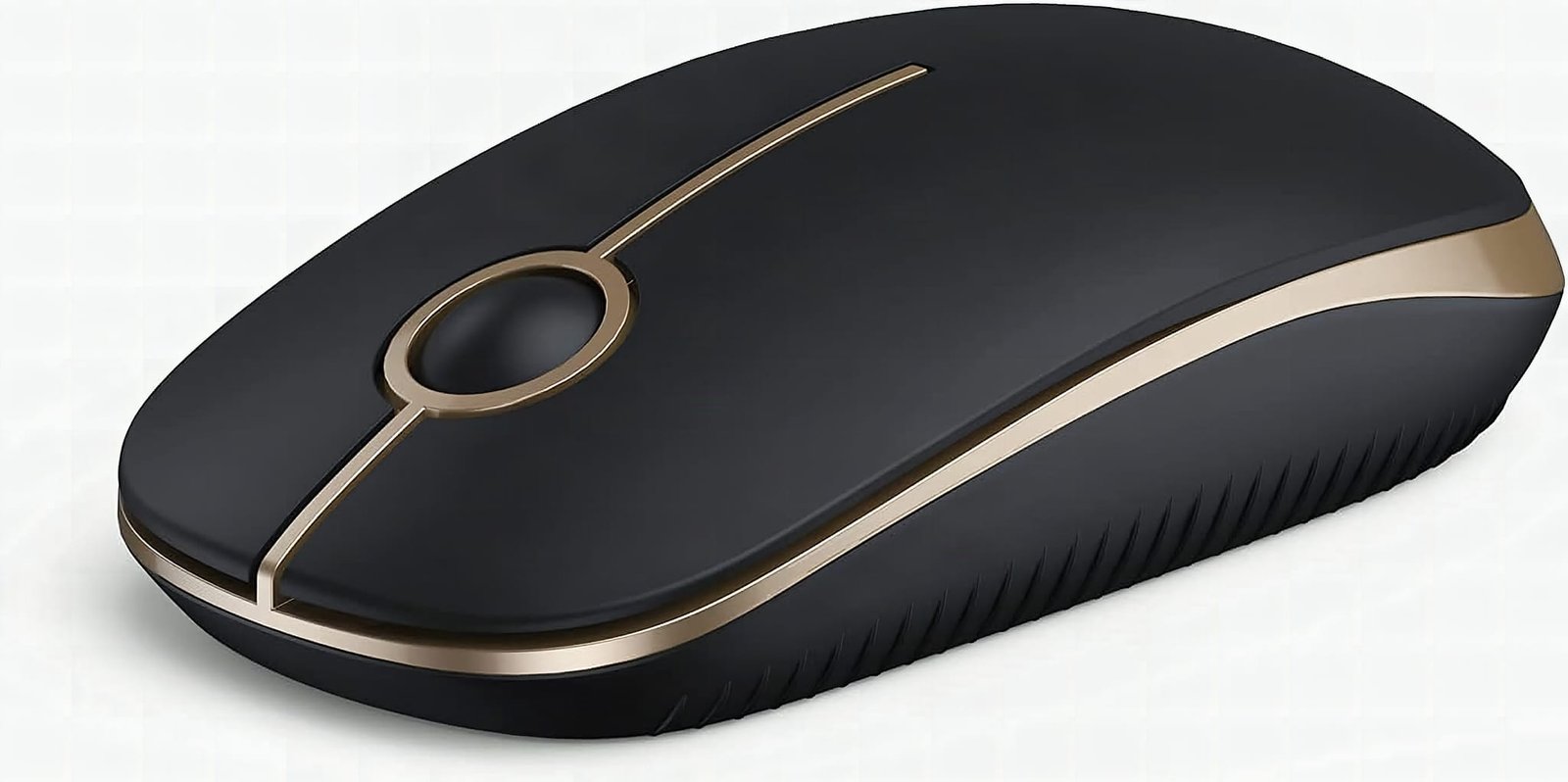
A black and gold wireless mouse with auto-sleep and quiet clicks. Connected instantly to my MacBook, but no AA battery in the box.
The VssoPlor wireless mouse does two things well: it’s genuinely quiet and the scroll wheel is the smoothest I’ve used at this price. It paired to my MacBook instantly, the black and gold looks sharp on a desk, and the 5-minute auto-sleep means one AA lasts far longer than you’d expect. The catch is that AA isn’t in the box, and newer MacBook users need a USB-C adapter too. Grab both when you order and there’s nothing to complain about.
This post contains affiliate links. I may earn a commission at no extra cost to you.
How this review was made: written from my own video review of this product. Every opinion here is my own, from using it myself.
Quick Verdict
Dropped in my own AA battery, flipped the switch, saw the light come on, and it paired to my MacBook right away. No problems whatsoever. The black and gold really sets itself apart, and the scroll does a phenomenal job.
Buy if you:
- want a quiet-click mouse for shared office or late-night work
- travel with a laptop and lose tiny USB dongles
- care how your desk looks and like the black and gold
- want something economically priced that still forms pretty well
Skip if you:
- expect a battery in the box. There isn’t one, I had to grab my own AA
- use a newer MacBook with no full-size USB port. I had to buy a USB-C adapter separately
- want a rechargeable mouse instead of disposable AA batteries
| Power | 1 x AA battery (not included) |
|---|---|
| Connection | USB receiver, stores inside the mouse |
| Sleep mode | Activates after 5 minutes idle |
| Clicks | Quiet-click buttons |
| Colors | Multiple combinations, including black and gold |
Black and Gold, and It Scrolls Clean
This is one of the probably most beautiful mouse I’ve seen. I love the color combination, black and gold, and it really sets itself apart from the gray plastic blobs I’ve used before. But the looks aren’t the reason I kept it on the desk. The ergonomic design sits right in the palm, the motion is smooth moving back and forth, and the scroll button does a phenomenal job moving pages up and down. I have not had any problems with it. You can see the current color options on Amazon if gold isn’t your thing.
Setup took about fifteen seconds: flip the mouse over, drop in a AA, flip the power switch, plug the receiver into a USB port. The light came on and the cursor moved. That was it, no driver prompt, no pairing sequence.
Two Things Not in the Box
No AA battery comes with it, so plan on that. I had to grab my own battery before I could do anything, the kind of thing that stalls you for a day if you don’t keep spares around.
The second one bit me harder. I use an Apple product, and the receiver needed a port my MacBook doesn’t have, so I had to buy a USB-C adapter. Not a deal-breaker. They don’t cost very much and you can get them on Amazon as well too. But if you’re on a newer MacBook, budget for the adapter up front instead of discovering it like I did.
Once I plugged the USB-C adapter into one of the open ports on the laptop, it connected right away. I didn’t have any problems whatsoever.
What a Wireless Mouse With Auto-Sleep Buys You
The 5-minute auto-sleep is the feature doing the quiet work here. A regular wireless mouse keeps sipping power while you’re off making coffee. This one shuts down after five minutes idle, so that single AA stretches a lot further than it would otherwise. Pair that with the receiver storing inside the mouse body and you’ve got a travel setup that doesn’t leave you hunting for a dongle in a bag pocket.
It’s very economically priced for what you get, and it’s been sitting at about its usual price for the past three months, so there’s no sale you’re waiting out. Amazon reports more than 8,000 bought in the past month, which tells you the quiet-click, cheap-and-portable combination is finding its people. Check today’s price on Amazon before you decide.
Would I Buy It Again?

Yes, and I’d add a USB-C adapter and a pack of AAs to the same order. Every complaint I have is about what’s missing from the box, not about the mouse itself, the tracking is smooth, the clicks are genuinely quiet, and the scroll wheel alone justifies the price. If you work in a shared space or carry a laptop bag daily, just buy it.
Frequently Asked Questions
Does it need an app or software to work?
No app, no account, no driver install. It’s a plug-in play USB receiver, so the operating system handles it. That also means no settings panel to remap buttons, which is worth knowing if you’re used to a gaming mouse.
Will it work with a Windows laptop or a tablet?
Any device with a compatible USB port should recognize the receiver without setup. I ran mine on a MacBook through an adapter. Tablets are hit or miss depending on whether the OS supports a USB mouse at all.
Where does the USB receiver go when I’m traveling?
Inside the mouse itself. The receiver stores in the body, which is the whole reason this one survives a laptop bag better than most. Get in the habit of dropping it back in there and you won’t lose it.
Clicking takes you to Amazon. As an Amazon Associate we earn from qualifying purchases — pricing and availability subject to change.
Get it now
Auto-Sleep Quiet Wireless Mouse
Get the best price on Amazon →Affiliate link. See the disclosure at the top of this post.

🛍️ Shop everything in this video
Every product mentioned, in one place. These are affiliate links, so I may earn a small commission at no extra cost to you.
🛍️ Wireless Mouse with Auto-Sleep (Black and Gold): check price on Amazon →
🛍️ Double A Battery: check price on Amazon →
🛍️ USB-C Adapter: check price on Amazon →