Logitech H390 Wired Headset Review: My Go-To Work Headset
My take on the Logitech H390 wired headset for laptop use: plug-and-play USB, crystal clear mic, and padding that works even for a bald head.
This post contains affiliate links. I may earn a commission at no extra cost to you.
Quick Verdict
This is my second one, and I bought it again for a reason. For work I don’t want the complications of a battery dying or a connection dropping, so a wired headset like the Logitech H390 just plugs in and works. Crystal clear mic, comfy padding, and no clumsy setup.
Buy if you:
- Live on video calls and meetings all day
- Want plug-and-play USB with zero software to install
- Hate battery and connection issues on wireless sets
- Want a headset comfy even on a bald head
Skip if you:
- Want to roam the house cordless while listening to music
- Need a wireless Bluetooth setup with no cable to the computer
- Are chasing premium audiophile sound over call clarity
Clicking takes you to the seller's website. We may earn a small commission if you purchase, at no extra cost to you.
| Connection | Wired USB-A, plug-and-play |
|---|---|
| Cable length | 6.23 ft (1.9 m) |
| Microphone | Rotating noise-canceling boom |
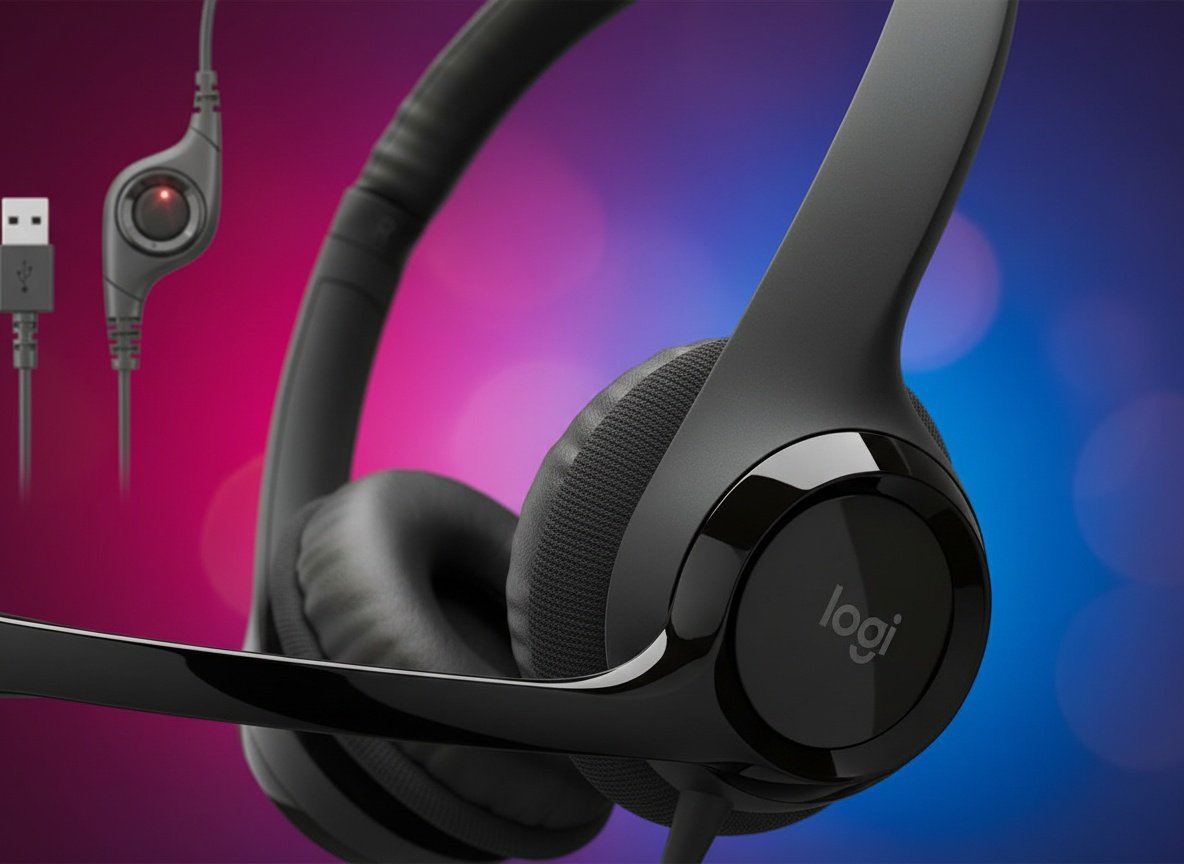
| Controls | In-line volume and mute |
| Colors | Black, White, Pink |
| Compatibility | PC, laptop, Chromebook |
My Second One, And I Bought It On Purpose
This is the headset I use all the time, and I just bought a brand new one to replace the first. That should tell you something. The Logitech H390 is a wired headset for laptop and PC work, and it’s become one of my favorites in a while. Here’s my thinking: at home listening to music I’ll grab a wireless set so I can move around. But at work I don’t want the complications of the battery going out or it not connecting mid-meeting. So I always use a wired headset. This one is dependable, and that word matters more to me than anything else here.
What The H390 Actually Is
It’s a plug-and-play USB wired headset with a rotating boom mic. You push the USB-A connector into your computer and you’re ready to talk or listen. No software, no drivers, no clumsy setup. The mic attaches to the left cup and sits right within reach of your mouth. The cable runs 6.23 feet, which is the detail that keeps this thing usable at a real desk. It’s one of the original Logitech headsets, has been on the market a long time, and it shows in how sturdy it feels out of the box.
Mic Is Crystal Clear And You Don’t Have To Shout
The boom mic is the reason I bought this twice. It sits close enough to my mouth that I speak at a normal conversational level, no leaning in, no shouting, and people on the other end hear me cleanly. On a six-hour meeting day, not once repeating yourself is worth more than any spec on the box. I’m not repeating myself, not leaning into the mic, not fighting background noise. The boom rotates and tucks out of the way when you’re done, so it isn’t hanging in your face all day.
The other thing I lean on is that long cord. I can be sitting at my desk and swivel around, and it doesn’t pull the cord out of the computer. No damage, no disconnecting mid-sentence. That 6-foot-plus cable gives you room to stand up and stretch during a long call without ripping the plug out.
The One Thing Wired People Give Up
You’re tethered to the computer, full stop. That’s the trade with any wired headset for laptop use. When I’m home listening to music I reach for a wireless set instead, because I want to walk around. The H390 won’t do that. If you want to wander the kitchen on a call, this cord ends that dream at about six feet. For me that’s a feature, not a flaw, because I’d rather deal with a cable than a dead battery mid-meeting. But it’s worth knowing going in, because the plug-and-play convenience comes attached to a wire.
Get it now
Logitech H390 Wired Headset
Get the best price on Amazon →This post contains affiliate links. I may earn a commission at no extra cost to you.
Comfortable Even On A Bald Head
I have a ball head, no hair, and this is very comfortable for me. That’s not a small point when you wear something for hours. The padding on the upper headband is what does it, and the ear cups use memory foam that conforms and springs right back. On my new one you push in on the ear cushions and they bounce back like they should. The whole set feels sturdy and nice and shiny on the black cups, ready to go the second you open it. That’s why it’s fast becoming one of my favorite headsets.
Who This Is Actually For
This is built for anyone whose job runs on calls, remote workers, students in virtual classes, people grinding through back-to-back meetings. If you’ve ever had a wireless headset die ten minutes before a presentation or refuse to pair when you needed it most, the H390’s USB plug is the answer. Works on PC, laptop, and Chromebook. Color options are black, white, and pink if that matters to your desk setup.
Wired H390 vs A Wireless Headset For Work
Wireless wins for freedom, the H390 wins for reliability. That’s the split. I use a wireless set at home for music because I want to move around, and that’s where Bluetooth earns its price. But a wireless headset also comes with the complications I don’t want at work: the battery going out, it not connecting when you need it, the pairing dance. The H390 skips all of that with a USB plug and a universal connection into the computer. For work specifically, dependable beats cordless for me every time.
Advice For Buyers

One practical note: route the cable behind your monitor so it doesn’t snake across your desk, and flip the boom mic up when you’re off calls, it keeps the hinge from wearing out. Beyond that, setup is genuinely nothing. Plug in the USB-A, and your computer picks it up instantly. I replaced my first H390 only because it finally aged out after years of daily use, not because it failed. That’s the whole case for buying it.
Pros
- Plug-and-play USB with no software and no clumsy setup
- Crystal clear mic, no distortion, no need to raise your voice
- Sturdy, durable build that’s ready to go out of the box
- Comfortable padding, even on a bald head, over long sessions
- Long cord lets you swivel at your desk without yanking the plug
Cons
- Wired means you’re tethered to the computer, no roaming
- Not the pick if you want cordless freedom for music around the house
- Call-focused sound, not built for audiophile listening
Frequently Asked Questions
Does the Logitech H390 work with a Chromebook?
Yes, it works with Chromebooks along with PCs and laptops. It’s a universal USB-A connection, so you plug it in and it’s recognized without installing anything.
Do I need to install software or an app to use it?
No. It’s plug-and-play, so you push the USB connector into your computer and you’re ready to talk or listen. There’s no software, no drivers, and no account required.
How long is the cable?
The cable is 6.23 ft (1.9 m). That’s long enough for me to swivel around at my desk and stand up to stretch without pulling the plug out of the computer.
Can I mute a call without touching my computer?
Yes. There are handy in-line controls on the cable that let you adjust volume or mute without going back to the screen. That matters when you’re jumping between calls.
What colors does it come in?
Black, white, and pink. Whatever color you need, you can get these in your favorite, so it’s easy to match your desk setup.
Is it comfortable for people who wear glasses or have no hair?
It’s comfortable for me and I have a bald head, so the headband padding does its job without a hair cushion. The leatherette ear cushions are swivel-mounted and easy to clean, which helps over long wear.
Can I use it for gaming or listening to music, not just calls?
You can, but it’s tuned first for calls and meetings. The stereo drivers handle music fine for casual listening, though I personally grab a wireless set at home when I want to move around while listening.
Does the microphone boom get in the way when you’re not on a call?
No. The boom rotates and tucks out of the way when you’re not using it. It sits right within reach of your mouth on the left cup when you need it and swings up when you don’t.
Will it work if I don’t have a USB-A port?
The connector is USB-A, so on a newer laptop with only USB-C ports you’d need a USB-A to USB-C adapter. Once it’s plugged in, it still works with no software.
Get it now
Logitech H390 Wired Headset
Get the best price on Amazon →This post contains affiliate links. I may earn a commission at no extra cost to you.
🛍️ Shop everything in this video
Every product mentioned, in one place — these are affiliate links, so I may earn a small commission at no extra cost to you.
🛍️ Logitech H390 Wired Headset — check price on Amazon →